


This post has been updated and moved! Please visit us here: https://www.freetodiscovermath.com/blog/zero-prep


This post has been updated and moved! Please visit us here: https://www.freetodiscovermath.com/blog/frameworks-for-scavenger-hunts


This post has been updated and moved! Please visit us here: https://www.freetodiscovermath.com/blog/bloom


We literally cannot do it all. There I said it.
I can't scroll through Facebook or Instagram without being inundated with all the tips and tricks and strategies that we must do in order to meet the needs of all learners.
I love new ideas. I love research and learning. But gosh, it's a lot right now!
Feeling the same way?
Read on as I share the 3 truths that you really need to hear today.
Try one new strategy at a time.
You do not need to have a Pinterest-perfect classroom or Instagram-worthy lesson in order to be an incredible math teacher. Sure, there are lots of great strategies out there: flipped classroom, one-to-one technology, math centers, interactive notebooks, games. But the truth is, you cannot do it all. The last thing we want is for teachers to become overwhelmed and burned out. If you're feeling refreshed and inspired and ready to try something new, choose one strategy or activity to implement. Get really good at that one thing by trying it again and again with different topics. Train your students how to successfully participate in this one thing. Then, and only then, should you consider adding something else to your teacher toolbox. And if you're not feeling like you can add one more thing to your plate right now, then don't. I am giving you permission today to not change a darn thing. You are enough. The fact that you show up for your students every day and do the best you can is enough. That leads me to truth number two.

Positive classroom climate makes the greatest impact.
You can try every strategy under the sun, and if there isn't consistent two-way respect in your classroom, nothing will have the impact you're hoping for. Relationships between students and teachers are boss. Your students need to know that you care, they are loved, and they are safe. Ask your students about their interests and hobbies. Use growth-mindset language to convey that you believe in them. Create an atmosphere where students are comfortably able to take risks without the fear of judgement or ridicule. Positive classroom climate has the greatest impact on student success. There will be plenty of pressure to improve test scores and use more technology and try this latest, greatest, flashy teaching tool. But I am urging you to build a positive learning environment first. Take time to talk to your students about things other than math. Get to know their strengths and challenges. Reach out to families about successes, as well as challenges. Once this foundation is set, then everything else will fall into place.

Meet students where they are.
Math confidence is key to student motivation and engagement. Students who struggle, and are not given the proper scaffolding, are going to give up. Don't let this happen. Don't let a stringent curriculum and textbook shape the learning experience for your students. Determine the skills that your students are entering with and start there. This could be accomplished via a brief pre-assessment or teacher observations. Build student confidence by starting with what they know and building on that prior knowledge - even if they are not up to grade level yet. Start with the basics and climb from there. Make clear connections between concepts to help students make the leap. Maybe you feel like there's not enough time to teach skills that should have been mastered in previous school years. I am encouraging you to do just that. Teach what your students need. Once their foundation is strong and confidence is high, the rest of the year will flow much more easily. Build a math class that is equal parts accessible and rigorous. Show students that they can do it.

So, math educator, will you let go of some of the pressure you're feeling please? Commit now to trying no more than one new strategy at a time, building a positive classroom climate first, and meeting students where they are starting. Do all of these things within your own comfort zone or just beyond it (scaffolding!). You've got this.
Comment below with other advice for teachers heading back to school this fall. What is a truth you want all math teachers to know?

Challenge Opportunity
Differentiation
Discovery
Intervention
Readiness
How to Differentiate Instruction in Math without the Stress of Creating New Resources
This blog post has moved: https://www.freetodiscovermath.com/blog/stress-free-math-differentiation
Interested in learning more about differentiated math instruction? Subscribe below to be added to our email newsletter so you don't miss a beat!


The research has long showed that teachers must differentiate instruction in order to meet the needs of all learners. Even when we understand that this just means making small adjustments to accommodate various needs within our classroom, getting started can be the most difficult part. This post will provide you with the three best zero-overwhelm strategies for differentiating math instruction in the secondary classroom. Within these broad categories, you'll read three different approaches for differentiation: interest, readiness and learning profile. It is important to note that when we are discussing readiness, or leveled learning, that this is not fixed. Often from unit to unit, or even within a unit, students' comfort level with the math concepts will vary, and therefore, different accommodations may be warranted.
Offer Two Choices
Hands down, offering students choices is the best place to start. This zero-overwhelm strategy could be used to pique student interest or accommodate different academic levels.
First, choose the topic or skill students will be practicing.
Next, find two different activities or worksheets that practice that topic or skill.
To increase student engagement, you could look for two different themes or styles for students to choose from. Perhaps one worksheet has science applications of linear equation word problems, for instance, while another has social media examples.
To accommodate variation in where individual students are in the learning process, offer two levels of the same topic. For example, some students can continue to work on solving two-step equations, while others move on to examples involving the Distributive Property and combining like terms.
To make adjustments for learning preferences, allow students to either select a worksheet for practice or a set of task cards. Students who benefit from working through one problem at a time will experience greater success when offered a task card set. Other students may prefer to see all the problems in one place to facilitate pattern recognition.
To ensure this remains a zero-overwhelm experience for you, the educator, do not try to recreate the wheel. Your curriculum may offer some of these options in textbook or worksheet form, there are tons of free resources online with a quick Google Search, or head to Teachers Pay Teachers for some quick, inexpensive downloads.

Assign an Open-Ended, Flexible Project
By assigning a project with flexible processes and outcomes, students can self-differentiate or you can push students towards a particular direction.
To promote interest and excitement, allow students to choose a data set when constructing and analyzing a scatter plot and its trend line.
To adjust for varying levels, steer students toward three-dimensional figures with less complex formulas when designing packaging - like the Play Dough Project.
To accommodate differing personalities and learning styles, simply allow students to decide if they want to work individually or with a partner; at a desk or in the hallway; on paper or with manipulatives.
Do not try to introduce more choices than you are comfortable with. The key is to start small. Choose one way to differentiate at a time. Over time, these strategies will become innate and you'll be able to practice more and more individualized instruction and choices.

Strategically Call on Students
One of my favorite ways to informally assess student understanding, engage students, and differentiate by ability is to have students come up to the front whiteboard in groups to solve problems. This works especially well when practicing a specific math skill that can be demonstrated in a short period of time in a couple of steps.
Here's how it works:
1) Ask all students to take out paper and pencil (or mini-whiteboards).
2) Call 4-5 students up to the front whiteboard, each with their own section of the board and an Expo marker.
3) Read a math problem aloud. All students - regardless of whether they are at their seat or at the front board - copy down the original equation, inequality or expression.
4) All students work through the same problem, showing all steps. As they do so, I offer help as needed first to the students at the front board, then to those students working independently at their desks.
Here is the key to making this successful. When calling students up to the front board, do two things. First, tell students that the problems will become more challenging each round (and do this). This will, first, get students to volunteer quickly and, second, allow students to self-differentiate by deciding when they want to volunteer. Second, be strategic in calling students to the front board. Use this as a confidence building opportunity for students who are struggling throughout the topic. You might also consider mixing ability a little bit so that students who struggle have a model at the front board with them, and this also helps to avoid inappropriate labeling among students.

Which strategy is your favorite? Which will you try? Be sure to report back in the comments section!
Interested in monthly inspiration directly in your inbox? Subscribe here!


We've all been there. We introduce word problem examples and, in response, we hear all the moans and groans from our students. Word problems are notoriously difficult for students and often require additional practice and intervention.
In the Discover Math Intervention Program, we strive to diagnose misconceptions and skill gaps and remediate through instructional videos and practice problems.
First, assign the Diagnostic Assessment to your students. The assessment is housed in Google Forms. Students answer between 5 and 10 questions in order to assess their understanding of the topic.
Then, if at any point students get two questions in a row incorrect, they are sent to a ten-minute YouTube video to provide remedial instruction and facilitate additional practice.

This particular diagnostic assessment and remediation video covers topics including translating one- and two-step equations from sentences and word problems.
The diagnostic assessment focuses on writing the actual equation. It assesses whether students can correctly translate the sentence or scenario into a linear equation. The remediation video lesson goes into more depth by addressing key words, steps for writing and solving linear equations in one variable, and detailed processes.
Once students watch the brief video lesson, they can go back through the diagnostic assessment to adjust their answers until they are correct and submit.
Try this lesson for free here.
Are you following this amazing news?
In the Discover Math Intervention Program, we identify and address math skill gaps for you!
The best part is that it can all be done via technology, so this program is perfect for remote or hybrid learning.
Are you interested in learning more about the Discover Math Intervention Program?
Membership is opening again soon. Join the waitlist here.


BINGO has long been one of my favorite ways to review math concepts with my secondary math students. Now I'm teaching about 100 seventh and eighth grade math students remotely, and my traditional version of the game is tricky, if not impossible.
Introducing BINGO 2.0: a fun, interactive review game for distance learning!
All you need is a question and answer PowerPoint with animations so that the answer doesn't show up right away. Prepare 15-18 math practice slides.
On each slide include a unique random number between 1 and 24 that will appear after the answer. More on this in a moment...
It's helpful to have the chat box activated on whichever video communication platform you are using. I am currently using Zoom, and I have the chat set up so students can only type directly to me.
And, finally, a digital BINGO board! I'm including my BINGO board here for free download.

How it works:
1) Before the game, have students set up their BINGO board. They drag-and-drop the numbers 1-24 - one number per box. This makes it so you can use this BINGO board for ANY game. Remember those random number you included on each slide? They represent the number that students can cover up on this board!
2) Share your screen with students so that they can see the question. They work on it on their own at home using something to write with and something to write on.
3) Students type their answers into the chat box. Give them some time warnings so that they can get their answers in.
4) Release the next animation to show the random number. If they got the question correct, they can cover up the random number on their BINGO board.
5) Repeat!

I have sets of Common Core-aligned math practice in Power Point form that could easily be converted into a digital BINGO game. They are now available in PowerPoint form & digital task card form. Shop here.


Buckle up! If you're not remote teaching yet, it could be headed your way soon!
A little background... my first week of remote teaching took place in November. In my local district, teachers were teaching both hybrid and remote students. It was a crazy amount of work!! Thankfully, our SAU found funding for a 7th/8th grade math remote teacher to take away some of the burden of the other classroom teachers. I think there was likely exactly ONE certified math teacher sitting at home researching and writing math content, so I applied. This blog post is all about my 5 key takeaways from my first week of remote teaching as I entered mid-trimester and took over teaching all of our remote 7th and 8th graders.
1) COMMUNICATE
Communicate clearly with parents and students. Make sure expectations and schedules are crystal clear. I took the time this week to send out batch emails with all the Zoom meeting times and links that they will need. I responded to every parent and student email promptly to ensure everyone understood the expectations of when to log on. My students in particular had been asynchronously remote learning for the first part of the year. This week I stepped in and the program itself was different. This caused a lot of confusion but emails and phone calls helped significantly.

2) ORGANIZE
I inherited 96 new students mid-trimester coming from 6 different math teachers. Oh. My. Gosh. The overwhelm potential was off the charts. I took a couple of hours right away to set up a binder for each of my 5 classes. I used dividers for each student. Then I organized every grades sheet printout from previous teachers, IEP, 504, ELL plans, important email correspondence, etc. I am so glad I took the extra time to do this, because now when I get a question about a student or an email from a parent I can open right up to that section of the binder and I have a little bit of context and background knowledge.
3) QUESTION
Don't hesitate to reach out to other teachers, guidance counselors, curriculum coordinators, ELL specialists, special ed teachers, administrators. Working from home can feel isolating if you let it. Especially as a new addition to the staff, I am trying to reach out to as many people as I can and attend all virtual meetings. Ask questions about why some students might not be engaging or how to best provide accommodations for other students. It takes a village! Don't let yourself become an island.

4) OFFER GRACE
I tend to hold pretty traditional values. I like work to be turned in promptly for full credit. I think attendance is extremely important. Videos on is the best way to engage in our virtual classroom. BUT I have decided to take a step back and offer grace. Often times we have no idea what is going on with our students and their families. Covid has flipped everything upside down and communities are struggling. So I'm choosing grace. When a student emails about missing a Zoom due to a doctor's appointment or needing an extension or whatever the situation might be, the answer is "Thank you for letting me know. No problem!"
5) SHOW UP
The most important thing is to show up and be there for your students every day. It is so challenging to get to know students when you've never met in person and often times I am teaching to little gray boxes. Well, I make sure I hear their voice at least once each class. For attendance this past week, students needed to unmute, correct any pronunciation errors of their first or last name, tell me their nickname if they have one, and then tell me their favorite number or (the next class) tell me about their pets. I write everything down, and it all just continues to help me understand and get to know the students that I'm working with. As a teacher, in general, I show up smiling and inserting little off topic stories in order to engage my students in everything I'm trying to relay to them. I will show up as a supportive adult for them as often as I can to make these crazy times just a little better.


In this post, you'll find a list of 10 websites that can facilitate teaching math to remote students. I am not affiliated with any of these websites. This post is merely a roundup of some great sites I've discovered.
1) VOCAROO
This free website allows students to upload a voice recording and share it with you.
Why I love it? Vocaroo allows me to get a better read on my students' understanding.

2) FRECKLE
This is an amazing resource for providing your students with online practice.
Why I love it? Freckle is differentiated and standards-aligned!

3) EDPUZZLE
Great for formative assessment, this website allows you to add your "magic touch" to videos.
Why I love it? I can add checks for understanding throughout my Edpuzzle videos!

4) KIALO
This is a free website for classes to use for discussion, debate, and collaboration.
Why I love it? Kialo provides an amazing opportunity for math classes to incorporate higher order thinking tasks.

5) YO! TEACH
This website hosts a backchannel chat for classroom use.
Why I love it? YO Teach! promotes cooperative learning and discussions among students.

6) GOSOAPBOX
This website is a web-based clicker tool that anonymously collects student responses.
Why I love it? GoSoapBox provides a great way to monitor student comprehension.

7) JAMBOARD
This Google product is a whiteboard app with awesome editing tools.
Why I love it? Jamboard helps make math visual.

8) CLASSCRAFT
This innovative website utilizes gaming principles to teach students.
Why I love it? The strategies used on Classcraft greatly motivate students.

9) NEARPOD
This website helps make print lessons interactive.
Why I love it? Nearpod helps me prepare my old lessons for remote learning.

10) EDULASTIC
This website identifies math skill gaps, remediates skill gaps, and tracks data.
Why I love it? Edulastic helps me prepare my students for standardized assessments.



So you have all of these wonderful stations activities that you've planned in the past, and now you can't use them as you have in previous years because, well, COVID. Stations are a great way to engage students in review activities! We can still keep many of the benefits of stations in mind as we plan digital stations. In this post, I'll share 3 tips for planning effective digital stations for your math classes.
Tip #1: Check for understanding by using a recording tool such as Vocaroo.
What I love most about stations is that I can listen in on math conversations and gage understanding of the topic students are practicing. Sadly, this type of interaction is often lost in a remote learning environment. I love using tools such as Vocaroo to have students record his or her thinking for me. Students can use the site to easily record an audio clip of their mathematical thinking. Then they can share the link so I can listen and provide feedback. This is a million times more valuable than answers on a page. Being able to hear my students talk through a math problem provides valuable data; not to mention it can help with relationship-building and classroom climate, too!
Tip #2: Promote collaboration among students using Google Slides and Google Meet.
Collaboration among students is essential to successful stations. To continue doing so digitally, use breakout rooms and Google Slides to continue collaboration among students. Students can "share" Google Slides with group members so that everyone's work is on the same slide. By placing students in breakout slides in Zoom or Google Meet, students can chat about the math as they type and work together. And I can pop into the group to monitor progress and answer questions. Any opportunities for students to connect with one another in a digital way is a positive step toward community, collaboration, and mental health.
Tip #3: Keep students on track by inserting a timer on your slides.
When I plan stations in the classroom, I project a timer on the board so that students have an awareness of how much time they have to work. This keeps systems working in a timely and orderly fashion. This strategy can adapted in a digital environment, too, by adding a timer to your Google Slides. Go to Insert --> Video. Then search YouTube for a 5-minute countdown timer. This will place a timer directly on the slides of your choice, and will keep students focused on the task at hand. This is especially helpful when using stations as part of a live virtual class in order to make sure students get the work done in the allotted period of time.
Exciting news! Free to Discover Stations are now available in both print & digital formats! You can shop here to download created-for-you stations.
Thanks for reading! What other activities are you working on making digital?


Halloween goes digital! Are you ready to engage your students in a rigorous and engaging Halloween-themed math activity? Whether you are teaching in the classroom or working remotely, we've got you covered! Since 2015, Free to Discover's Halloween activities have been wildly popular because they engage students in relevant and rigorous learning activities, while embracing the excitement of the time of year. Students solve math problems, work collaboratively, and solve riddles.
And now there's a brand new line of Halloween activities built especially for Google Drive! These digital activities provide students with clear directions on the first Google Slide so they know exactly what they need to do in order to complete the activity. Students solve each mathematical problem that is presented. Then they can drag and drop the answer to the indicated place on each math card. Each math card has a letter so that letters and numerical answers match up and can be used to decode the riddle!

Students solve each problem. They can type answers on the provided workspace slide or they can upload a photo of their work if they prefer to handwrite the mathematical steps. 8 possible answers to the 6 questions are available in the margin. Then students drag-and-drop each correct answer to the black circle on the appropriate math card.

Once students have matched up the 12 answers with each card, they can decode the riddle by substituting letters for the numerical answers. Once again, the letters can be dragged-and-dropped to the appropriate place. Not all answer/letter combinations will be used.

These resources are easy to implement and super engaging for students! Current math topics available include: Solving Multistep Equations, Solving Two Step Equations, and Calculating Slope Given Two Points.
The resources include:
- Teacher's Guide
- Student Instructions
- 12 Practice Problems
- Student Workspace
- Halloween Riddle Component
- Answer Key

Click the images to learn more and shop:


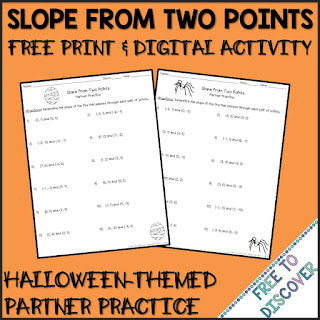
And while you're here, scoop up this newly updated FREE activity for calculating slope from two points! It includes PDF and Google Drive versions. Intended to work as a partner activity, each worksheet contains 12 practice problems. Although each worksheet has different pairs of coordinates, each corresponding question number will yield the same slope so that students can complete their own work and then compare answers with a partner. Download now, and then let us know how it went!
Want to save this idea for later? Pin it!


Learn more here:
